5 Post-Challenge
Results and certificates are usually available approximately two weeks after the challenge fortnight closes. We will update the calendar page when results and certificates are released.
5.1 Exporting School Results
To access your school's results, go to the Export Results menu.
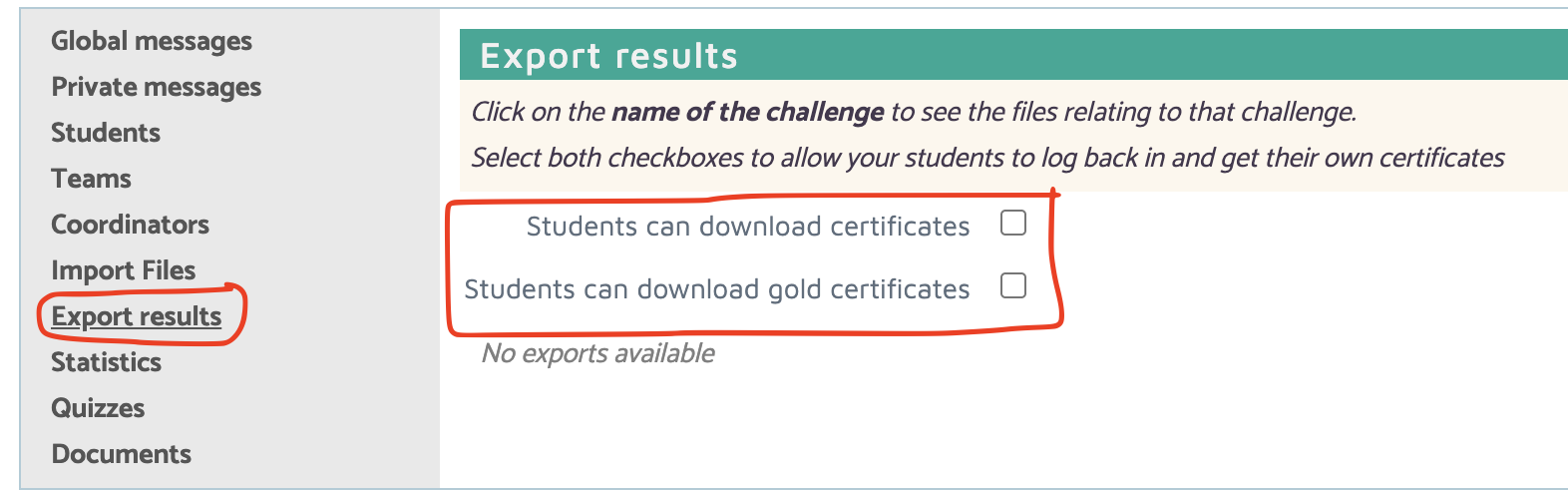
If your school has participated in a challenge, a folder name will appear for that challenge.
If you have hundreds of entries, it might be more convenient for you to let students print their own certificates.
To do this:
-
Enable student certificate access using the options available in the Export Results menu.
-
Explain to your students that they can get their certificates by logging back into the challenges page on the Bebras website and going to the Score section. The certificate link(s) will display below their score.
Provisional results
We will release provisional results before the official results are published. This allows coordinators to check scores and participation. If there are any queries, you can contact us at info@bebras.uk.
Official results
When the official results are released, there will be:
- Excel files containing scores and achievements for all students
- PDFs containing all certificates.
5.2 Certificates
Certificates are awarded primarily using school-based rankings to encourage participation and recognise achievement within each school.
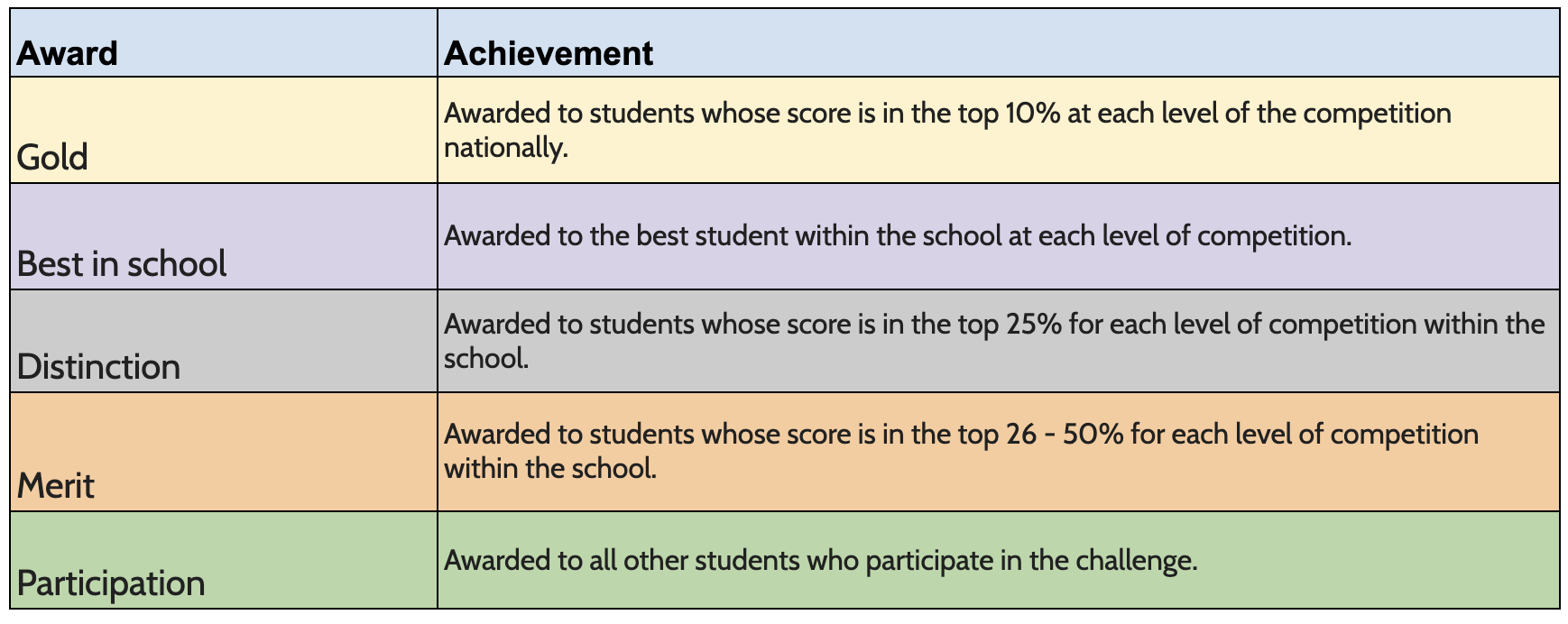
Certificates are normally awarded using school boundaries rather than national boundaries.
This is to encourage participation of all students in all schools.
For home educated students or schools who have entered only one student, and do not feel that the system certificate is appropriate, you may prefer to use the blank certificates available on the website and apply the national boundaries instead.
5.3 Downloading Certificates
Step 1
On the Admin site, go to Export results and click on the relevant PDF file(s) in the Certificates and Gold Certificates sections.
-
If your school has a large number of participants, please do not download all the certificates at once. You will find it easier, and the documents will download faster, if you do it an age group at a time.
- You can filter certificates by Group, Name, or Class.
-
There will be a slight delay while the file is generated and then a PDF file of your certificates will be downloaded. Before you proceed to step 2, check the certificates:
-
If the school name is incorrect, update it from the School section of the Account area.
-
If any student names are incorrect, you can edit the name through the Students menu option in the admin area.
- Once changes have been made, re-download the certificates.
Step 2
You will need to download the Gold Award certificates separately as they are calculated in a different way to the other certificates. These are for the top 10% achievers nationally.
Step 3
When you are happy that the certificates are correct, print out the file.
5.4 Blank Certificates
There may be circumstances where the certificates generated do not contain the correct information for example, home-educated students or extra-curricular clubs. In this case, there are blank certificates available in the DIY Certificates section of documents. These can be downloaded and printed as required.
5.5 Getting the Answers
As well as a full set of results, we also publish a full set of answers in a booklet for each challenge. You will find it in the Documents section of the admin site. The answer booklets will provide you, and fellow teachers, with the answers and solving strategies. It also contains details of which computational thinking skills could be used to solve the problems and how the task is related to computer science.
The answer booklets are made available to coordinators as confidential documents. The answers should not be shared with students or anyone outside of your school. This is because publishing them can compromise other countries' competitions, which may be held at a different time. Many teachers also set past questions as practice tasks so it is important that the answers are not made widely available.
5.6 Review Mode
Once the results are finalised, the challenge is set to Review Mode. This enables the students who have taken part to log back in and see their score. They can also see which tasks they attempted correctly and will be able to have another go at the ones they couldn’t complete. Teachers can make use of the answer book to guide the students, which can be helpful preparation for future challenges.
5.7 Feedback
Please send any feedback about the challenge, website, or documentation to info@bebras.uk. We welcome suggestions, feature requests, and ideas for improving our resources.
Return to guide