4 Running the Official UK Bebras Challenge
The official Bebras Challenge runs over a fortnight in November. You can find the exact date in the calendar on the UK Bebras website. You can run the challenge at any point during the fortnight and different classes may take part on different days.
Before you run the challenge, you need to check the devices that the students will use and make sure that student accounts are set up correctly.
4.1 Pre-challenge checks
The best way to prepare is to have students attempt a previous year's challenge on the devices and in the room that will be used for the live challenge.
Important: If the challenge fortnight has already started, the live challenge will appear on the challenges page when the students log in. Do not allow students to access the current year's challenge until they are in the supervised session. They do not need to log in to access previous challenges
Additional checks
If you are unable to carry out a full test session with students, you should:
-
Make sure that student accounts on your school network are allowed to use JavaScript and that cookies are enabled.
-
Make sure that student accounts can access the UK Bebras website and it is not blocked by any school filters.
-
Test several devices in each classroom that will be used for the challenge.
-
Create a test student account (see creating an individual student account). Login to the live challenge as the test studnet and ensure the questions are loading correctly and answers are being saved.
4.2 Technical requirements
4.3 Printing usernames and passwords
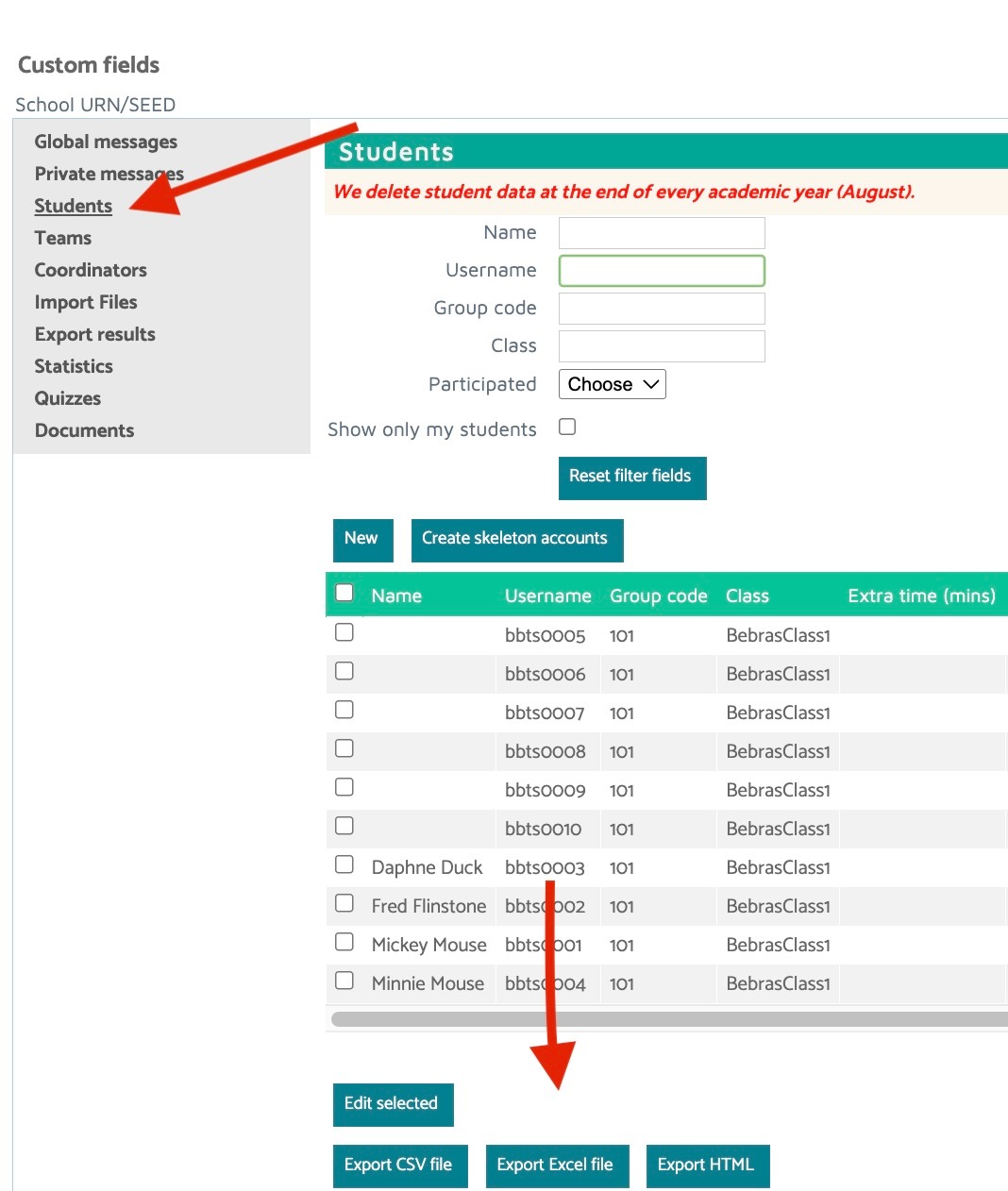
Make sure that each of your supervising teachers has a list of students’ usernames and passwords so that these can be allocated to students on the day of the challenge. These can be made into slips and handed out to students.
From the Admin menu, select students and choose one of the Export options.
4.4 Choose a date
You may need to run the challenge over several days if you have a lot of students. You may want to allow some contingency time in case anything goes wrong. Support for the challenge will be available 8am-6pm, Monday to Friday. Please note that the challenge closes at 6pm on the final day.
We are not able to extend the official UK Bebras Challenge period.
4.5 On the day of the challenge
Step 1
Make sure students have their username and password. They can also have a pen or pencil, scrap paper, and a calculator if they wish. Students are not allowed to use any websites or reference materials to assist them in solving the tasks.
Remind students that the challenge runs over a fortnight and that they should not post information about the questions on social media or discuss them with friends at other schools.
Step 2
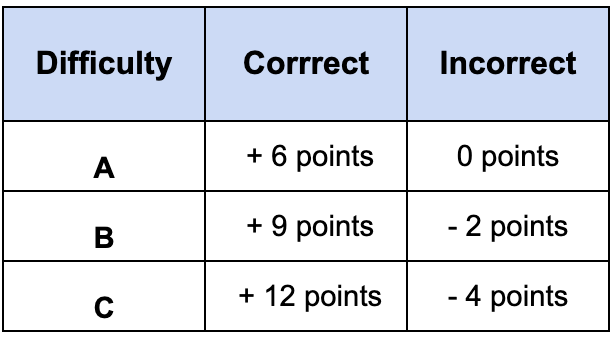
Check that the students understand how the scoring system works. Encourage them to do their best and explain that they are not expected to be able to answer all of the questions. The challenge is to correctly solve as many problems as they can in the time available.
Step 3
Instruct students to go to the UK Bebras website and log in using their allocated username and password. Tell them NOT to press the Start button.
Step 4
The time allowed is 45 minutes (unless the student has been given extra time). The countdown timer starts when the student presses the Start button.
Step 5
When you and the students are completely ready (everyone has logged in and students have had the opportunity to ask any questions of clarification), instruct the students to press the Start button. Their challenge will now begin.
4.6 Troubleshooting
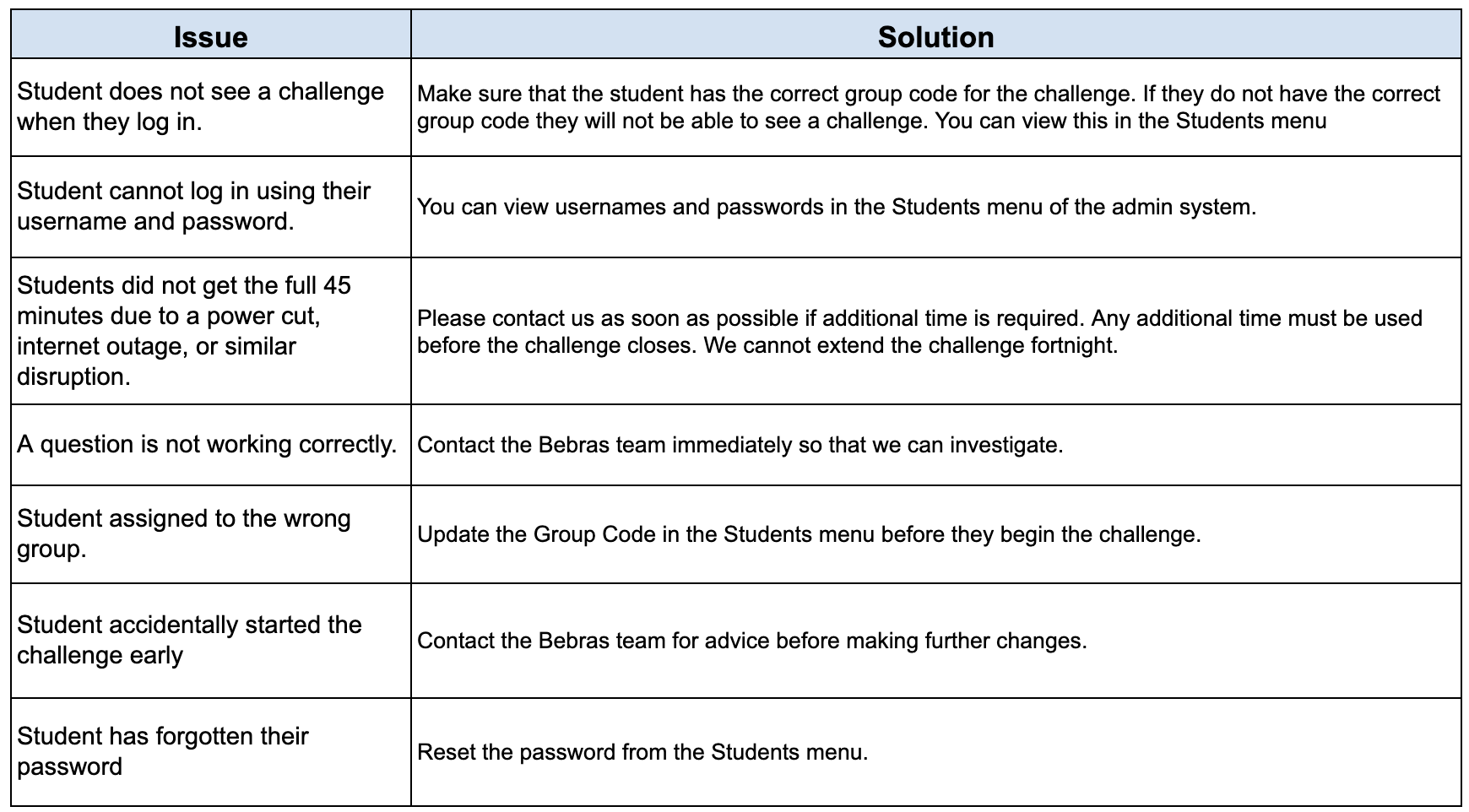
Anything else, please contact the team at info@bebras.uk.
Return to guide