1 Admin
1.1 Registering as a Coordinator
To register as a coordinator, visit bebras.uk/admin and select Register as coordinator.
Step 1: Select your school
Search for your school by entering its name in the search field. Matching schools will appear below as you type.
Once your school appears in the list, click Select.
If your school does not appear in the list, please complete the school registration form. We will add your school to the system and notify you once this has been completed. This will be processed within 5 days of the form being submitted.
Step 2: Complete your details
After selecting your school, you will be taken to the registration form. Complete all required fields and submit your registration request.
Approval process
If you are the first coordinator at your school
For safeguarding purposes, before we can approve your account, we need to verify your status as a teacher at the school.
Please arrange for your school to send an email to info@bebras.uk confirming that you are a member of staff:
-
The email must be from a general school email address which is clearly listed on the school’s website (e.g. admin@schoolname.org or office@schoolname.org).
-
The email should copy you in, with the same email address that you have provided for your Bebras account.
If your school already has a Main Coordinator
The Main Coordinator can approve your registration request. They will receive an email explaining how to review and approve coordinator requests.
If the existing coordinator is no longer at the school
We will carry out our standard verification checks for a new coordinator to confirm that you are a member of staff. Once your account has been approved, please email info@bebras.uk to request the removal of any coordinators who have left the school.
1.2 Coordinator Roles
There are two coordinator roles:
- Main Coordinator – Has access to all functionality and can approve, manage, and remove other coordinators.
- Coordinator – Has access to all functionality except coordinator management.
1.3 Admin Area
After logging in at bebras.uk/admin, you will see the Coordinator Dashboard, similar to the example shown below.
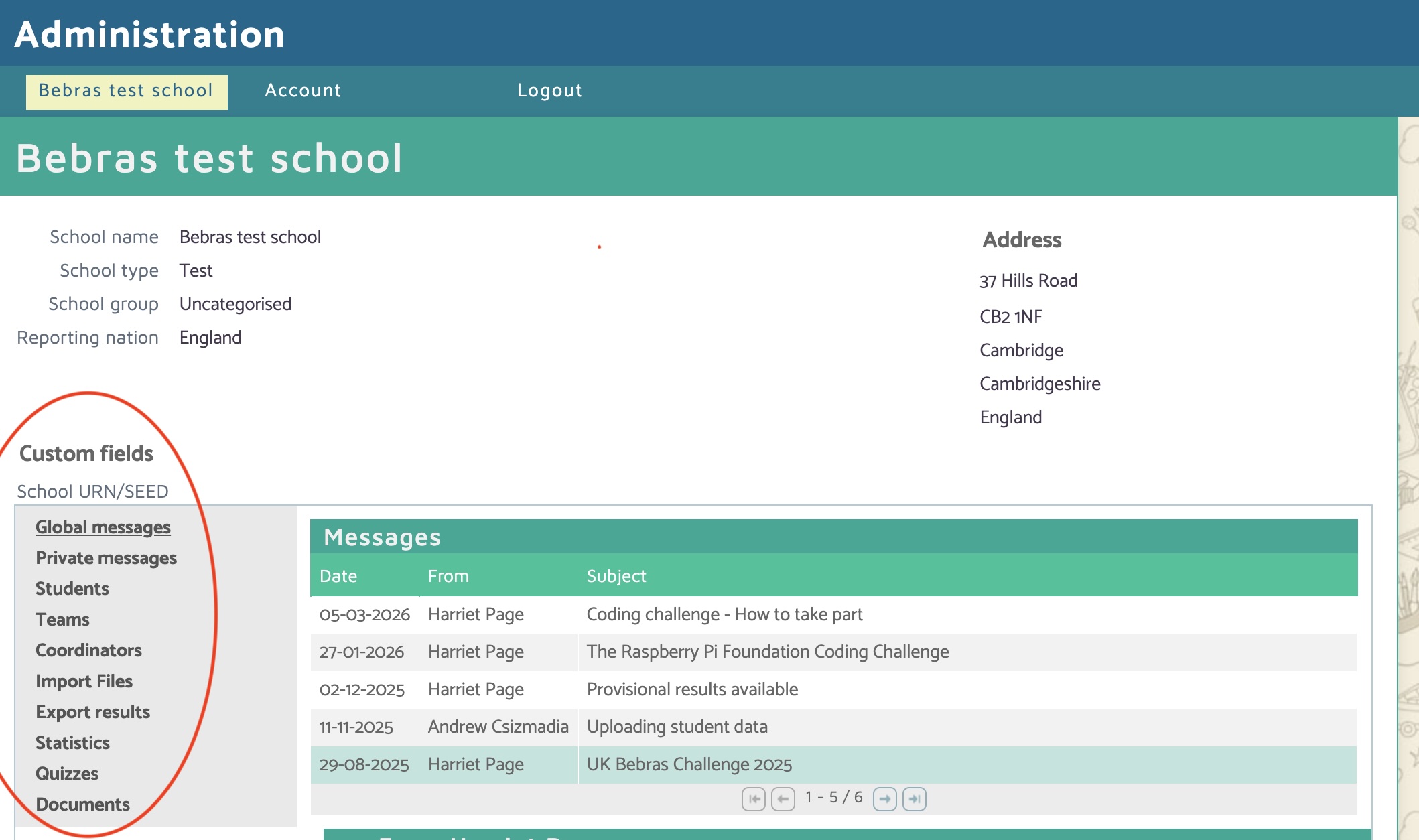
The menu on the left provides access to all of the features available to school coordinators:
- Global Messages – Important announcements and updates sent to all schools. Check this section regularly for important updates.
- Private Messages – Messages sent directly to you by the Bebras team, particularly if we are unable to contact you by email.
- Students – View, edit, and manage student accounts. You can create individual student accounts or generate skeleton accounts.
- Teams – Create and manage teams (Kits and Castors only).
- Coordinators – View and update coordinator details for your school.
- Import Files – Upload student data in bulk using a spreadsheet template.
- Export Results – Download student results, certificates, and other reports.
- Statistics – View your school's performance statistics and compare them with national results once the challenge has closed.
- Documents – Access useful resources, including templates, guidance documents, and blank certificates.
1.4 Consent
When you sign up for an account, you confirm that you accept our terms of use, including our privacy policy. The privacy policy lays out the assurances we give about how we will look after you and your students' personal data and allows us to comply with UK and EU regulations (GDPR).
During registration, you can choose whether to opt in to receiving marketing emails from us. We will only contact you via email regarding training opportunities, free teaching materials, expert guidance, and new products from the Raspberry Pi Foundation. If you no longer wish to receive these emails, go to the Account page and untick the mailing consent box.
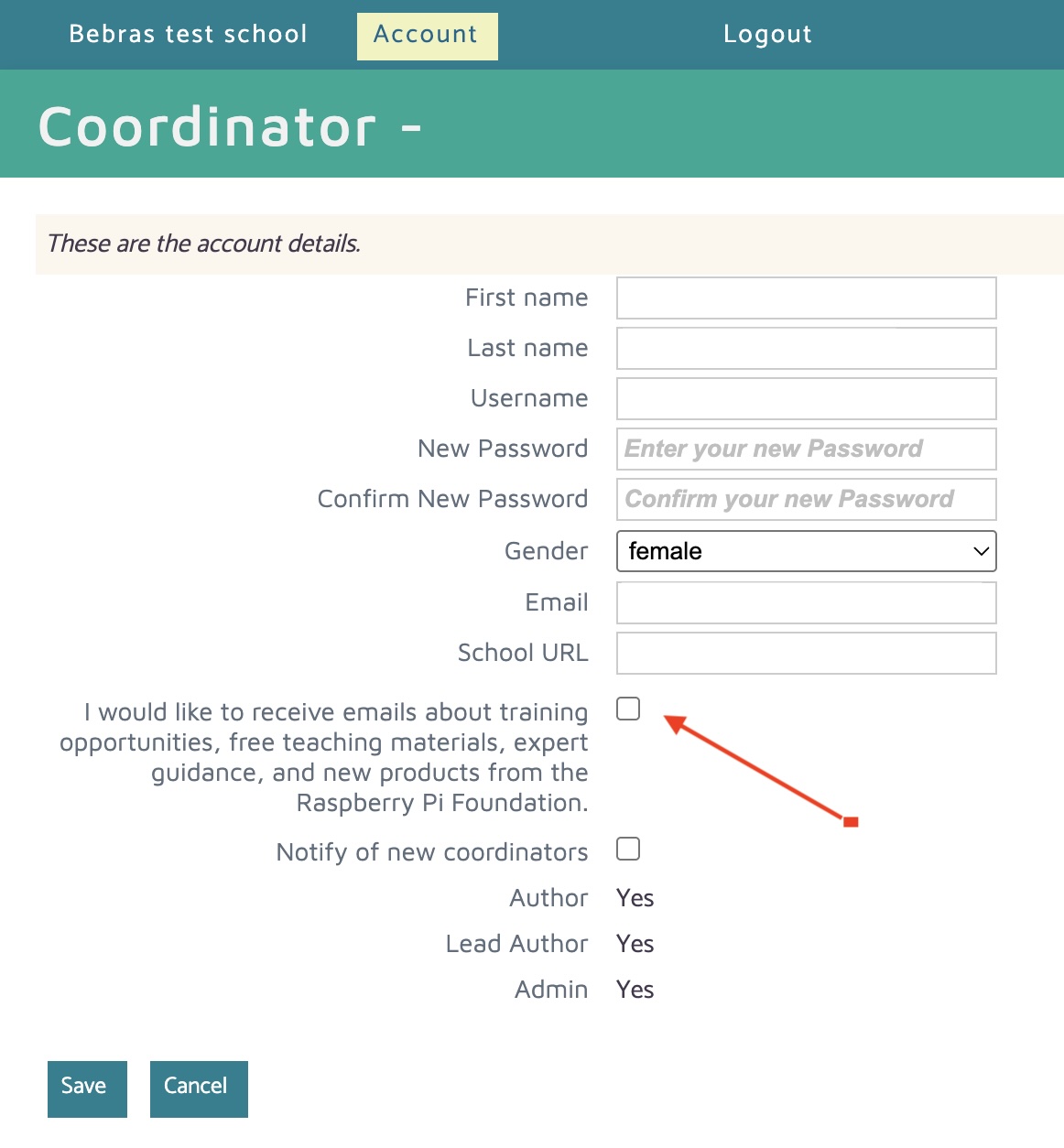
If the Privacy Policy or Terms of Use are updated, we will notify you and ask you to review the revised documents.
1.5 Account Settings
To view or update your account details, select Account from the top menu.
From this page, you can update your personal information and account settings as required.
If you no longer require your coordinator account, please contact the Bebras team to request its deletion.
1.6 Documents
This section contains useful resources and documents, organised into folders for easy navigation. If you cannot find a document you need, please contact us at info@bebras.uk
Return to guide